

Power Your Service Business with WePro
Power Your Service Business with WePro
Bring your service workflow together with WePro.
Power Your Service Business with WePro
Power Your Service Business with WePro
Bring your service workflow together with WePro.
New job requests come in fast, from calls, web forms, texts, and referrals. If your team is tracking leads in a notebook or a shared spreadsheet, follow up gets missed and the schedule stays emptier than it should.
WePro keeps every request in one place with clear lead status, owner, notes, and next steps. You can respond faster, stay organized, and turn more estimate requests into booked jobs.
Power Your Service Business with WePro
Power Your Service Business with WePro
Bring your service workflow together with WePro.
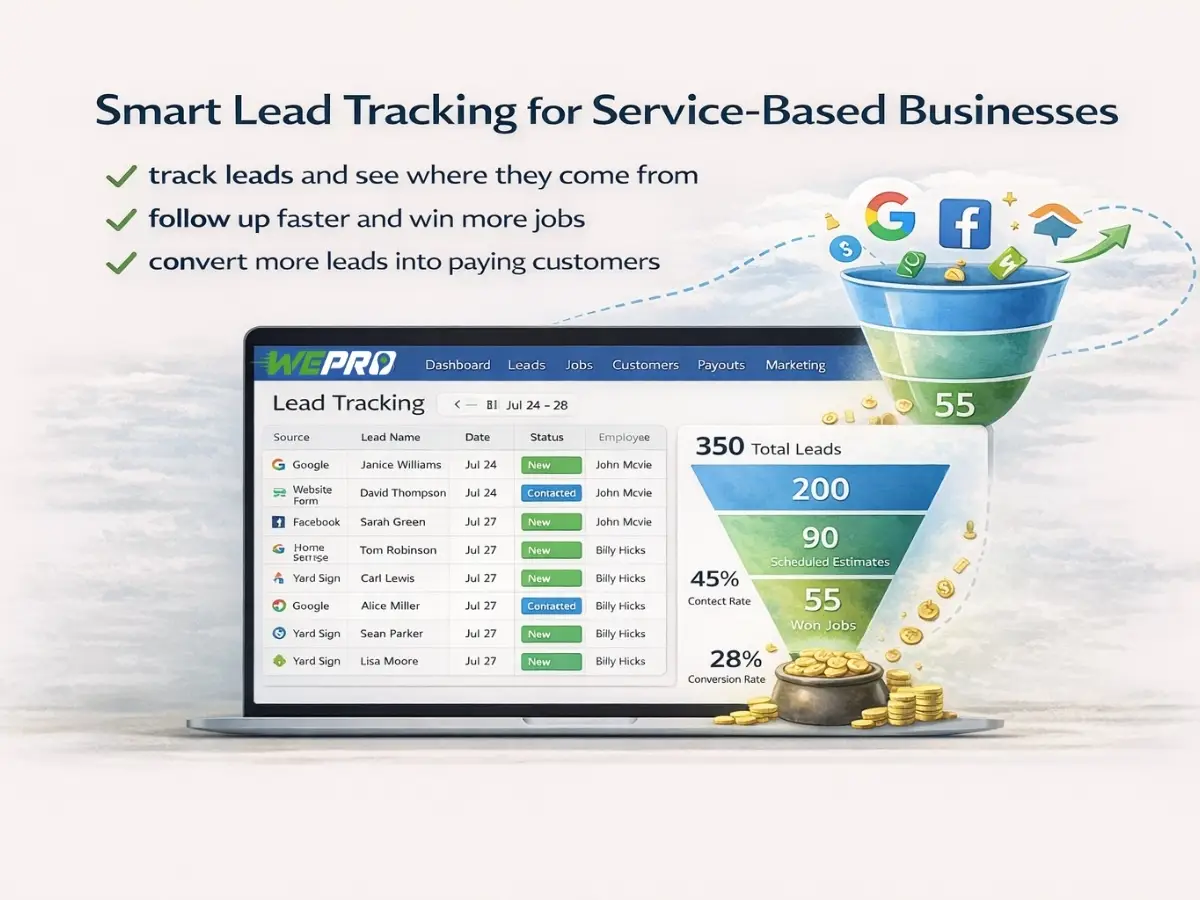

Move each lead through a simple lead pipeline with clear lead status.

Assign follow up tasks so nothing sits untouched for days.
Capture new requests from calls and online inquiries without losing details.

Leads don’t get lost because your team is busy. They get lost because the handoff breaks, between the phone, the office, and the field. WePro lead tracking keeps all new job requests in one workflow so you always know what came in, who owns it, and what happens next.
Use service lead tracking to log the customer, the issue, the address, and the preferred time window. Track what was promised on the phone. Save photos or notes from texts. When the customer calls back, anyone in the office can see the full conversation and current lead status.
This is home service lead management that fits the way you work. It’s built for fast intake, clear follow up, and clean conversion to an estimate or a job, without hunting through inboxes or asking “Did anyone call them back?”
Power Your Service Business with WePro
Power Your Service Business with WePro
Bring your service workflow together with WePro.

A clean lead pipeline helps the office stay calm on high-volume days. With WePro, your team can sort and work leads by status, source, priority, and schedule needs using Lead Tracking. You can see what’s new, what’s waiting on an estimate, and what’s stuck.
Lead tracking should make follow up simple. Add next-step notes, set a reminder, and mark outcomes so your team isn’t calling the same person twice or skipping the ones ready to book. If your dispatcher needs to jump in, they can pick up right where the last person left off with Dispatching and Job Scheduling.
Most leads don’t say yes on the first touch. WePro supports steady lead follow up without clutter. Your office can keep the conversation moving, capture objections, and document what the customer needs to decide.
When the customer is ready, you can push the lead into Estimates or straight into Job Scheduling without re-entering customer information. That keeps your schedule moving and helps the field team show up prepared.
Power Your Service Business with WePro
Power Your Service Business with WePro
Bring your service workflow together with WePro.

If the phone is your main source of work, call lead tracking matters. WePro helps your team log calls and keep a clean history tied to the lead record. That way, you can see what was discussed, what was offered, and what the customer expects, before anyone calls again.
When you connect lead tracking to your workflow, fewer things slip. The office can confirm details, share the right info with the tech, and avoid last-minute surprises at the door. Everyone works from the same record, even when shifts change.
Leads are only useful if they turn into scheduled work and paid invoices. Once a lead becomes a job, your team can continue the process in Dispatching and Jobs Tracking. The customer record stays consistent from first contact through completion, so you don’t lose job details during the handoff.
Power Your Service Business with WePro
Power Your Service Business with WePro
Bring your service workflow together with WePro.
Lead Tracking works best when everyone uses the same simple steps. WePro supports a clear workflow that office teams can repeat without extra tools.
A practical setup looks like this:
Your goal is consistency. When the steps are clear, a new hire can help with intake. When the record is complete, a dispatcher can schedule faster. When the handoff is tight, the technician arrives with the right context.
You can keep this lean. The best pipeline is the one your team actually updates.
| Lead status | What it means | Typical next step |
|---|---|---|
| New | Just received a request | Confirm details, set expectation for next contact |
| Contacted | You reached the customer | Qualify the job and confirm address and timing |
| Estimate Needed | Customer wants a price first | Create and send an estimate, set follow up date |
| Waiting on Customer | Customer is deciding | Follow up based on promised date and notes |
| Booked | Time is scheduled | Create the job and dispatch the right tech |
| Closed / Lost | Not moving forward | Record reason and move on cleanly |
Lead tracking is not just for sales. It’s for the whole operation.
Lead tracking is most valuable when requests come in from many places and you need order fast.
Keep urgent calls at the top, document what was promised, and schedule quickly without losing the details.
For replacement work or larger repairs, track estimate requests, document options discussed, and keep follow up tied to the customer record.
Log the request, assign it, and make sure it gets a next action first thing in the morning. No more searching voicemails and sticky notes.
Keep the history tied to the customer, so your team knows past work and preferences before quoting or scheduling.
A lead is only the start. WePro is built for the full job lifecycle, so your team doesn’t have to start over once the customer is ready.
When you convert a lead, you can carry forward:
From there, your team can schedule, dispatch, and Jobs Tracking the job through completion. Once the work is done, you can continue into Invoicing and payments without breaking the workflow.
If your pipeline gets messy, it’s usually because the basics aren’t consistent. These small standards keep the system reliable.
With WePro, lead tracking gives you a shared view of what’s happening right now. The office can see what’s new, what’s pending, and what’s ready to schedule. Owners can spot bottlenecks without hovering. Dispatch can plan the week based on real demand, not assumptions.
When your lead pipeline is clear, your schedule is easier to fill. And your team spends less time chasing information and more time booking work.
Let WePro handle dispatch, updates & payments so your team can finish more jobs with less back & forth.
Power Your Service Business with WePro
Power Your Service Business with WePro
Bring your service workflow together with WePro.

Here are quick answers about scheduling, communication, billing, reporting, and getting started with WePro.
The lead pipeline is a simple workflow that shows where each lead stands. You can move leads through stages that match your process—like New, Contacted, Scheduled, Sent Estimate, Won, or Lost—so dispatchers and office staff can quickly prioritize the right next step and keep service lead tracking consistent.